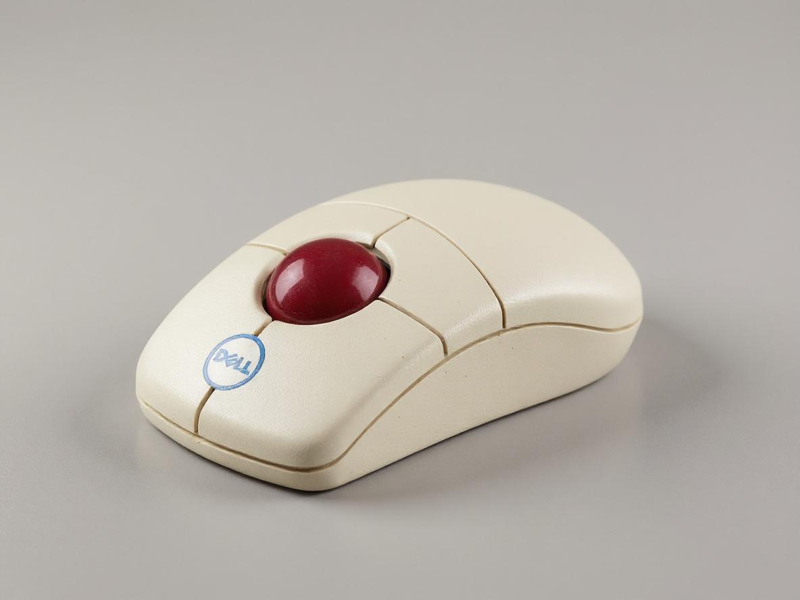
Modern computers now rely on sleek optical and wireless mice. These devices look stylish, respond quickly, and require little care. Yet, the Dell Ball Mouse still has a unique story to tell.
This mouse was once a standard accessory for Dell desktops around the world. For many first-time computer users, it was their very first experience with navigating a digital screen. Schools, offices, and homes adopted it widely during the early years of personal computing.
Despite its straightforward design, the Dell Wireless Mouse/ Dell Wired Mouse had a significant impact on how people used computers. Its smooth rolling ball made pointer movement possible, long before sensors and lasers became common.
With every click and scroll, it introduced millions to the basics of computing.
Even though technology has advanced, the Dell Ball Mouse has not vanished completely. Collectors keep it, budget setups reuse it, and some industries still use it.
It continues to appear in surprising corners of the digital world.
In this blog, we will explore its design, the working system, its advantages, disadvantages, and the reasons it still matters today.
What is a Dell Ball Mouse?
The Dell Ball Mouse uses a small rubber ball at its base to track movement. The ball rolls when the mouse is moved. This rolling is translated by internal sensors into screen cursor movement.
In the 1990s and early 2000s, Dell included this mouse in a lot of desktop computers. It was durable, affordable, and useful. Many schools and offices used it daily. For millions, it was the first tool to explore software and the internet.
The design of the Dell Mouse was very straightforward. The rubber ball made direct contact with the desk or mousepad at its base.
Two internal rollers detected both horizontal and vertical movement as it rolled. These rollers then transmitted signals to the computer, allowing the pointer to move across the screen.
Despite being mechanical, the system was effective for most everyday tasks. Additionally, the mouse’s design made it simple to repair. Users could simply remove the ball and clean the rollers inside if the cursor began to skip or drag. Frequently, a quick wipe with a tissue or cloth was all that was needed to restore smooth operation.
This level of repairability was highly prized in an era before disposable electronics. The ball mouse was included in many of Dell’s desktop packages. This method made the accessory accessible to individuals in a variety of settings, including offices, homes, classrooms, and libraries.
The mouse became more than a tool; it became part of the learning curve for an entire generation. For students, it was their first step in digital education. It was the tool that professionals used to navigate reports, spreadsheets, and emails. Many people still feel nostalgic when they think back to the Dell Ball Mouse because of the sense of discovery it brought to the early days of personal computing.
Design and Build Quality
The ball mouse was designed by Dell to be durable and functional. It consisted of:
- It has a curved design which makes this easy to hold.
- Two main buttons for left and right clicks.
- A scroll wheel in later versions.
- A ball that can be taken out at the bottom for tracking.
- Wired connection via PS/2 or USB.
- The gadget lacked flash. But it lasted long and handled heavy use with ease.
How the Dell Ball Mouse Works
The working system is mechanical. Here’s the process:
- The ball rolls as you move the mouse.
- Two rollers inside track horizontal and vertical motion.
- Sensors very easily detect this movement and then, send signals to the computer.
- The cursor moves on screen according to ball rotation.
Advantages of the Dell Ball Mouse
The Dell Ball Mouse had many benefits in its time:
- attainable for offices, schools, and homes.
- Strong build quality ensured years of use.
- worked without special pads on the majority of flat surfaces.
- Easy to clean and repair if performance dropped.
These strengths made it popular during its peak years.
Role in Offices and Schools
In the 1990s, the Dell ball mouse india was widely used. Because it was affordable and dependable, offices relied on it. Schools used it to introduce students to computers.
For many first-time users, it became the default input device. Some people’s earliest digital memories were created by using a ball mouse.
Why It Still Survives in 2025
Surprisingly, the Dell Ball Mouse has not disappeared. Here’s why:
- Some people love the feel of older devices.
- Ball mice are still used in some systems.
- They are reused in low-cost environments.
- They can last for decades if they are cleaned properly.
- They are kept by many collectors as a part of the history of old computers.
Dell Ball Mouse vs Optical Mouse
- Laser sensor or an LED is used in the optical mouse. But this Mouse uses a ball and rollers to track movement.
- The optical mouse provides high accuracy, while the this mouse provides moderate precision.
- Thisl Mouse needs frequent cleaning, while the optical mouse requires very little maintenance.
- The optical mouse is smooth and quick, whereas this mouse feels heavier and has more drag.
- A Dell Ball Mouse’s ball eventually breaks down, whereas optical sensors typically last longer.
- Initially, optical mouse were more expensive. But this mouse was less expensive in the past.
Maintenance Tips
Maintain your Dell mouse wireless / Dell Mouse Wired if you still own one:
- Frequently remove and clean the ball.
- Carefully remove dust from the rollers.
- Use the mouse on smooth surfaces.
- Keep it away from liquids and dirt.
It may function for years if you follow these steps.
Legacy and Collectible Value
The Dell mouse for laptop is more than a tool. It is part of computing history. Collectors seek out old models, especially those bundled with classic Dell desktops.
Retro computing fans also showcase it to younger users. It demonstrates how input devices once worked. In that sense, the Dell Mouse is both a functional tool and a piece of nostalgia.
So, The Dell Ball Mouse or Dell mouse bluetooth played an important role in everyday computing. It gave users their first experience of moving a cursor and clicking through programs.
Today, optical and wireless mice dominate. But the ball mouse remains useful in some industries and among collectors.
If you find one in your drawer, don’t dismiss it. It’s a durable, practical, and historic device. More than that, it’s a reminder of where personal computing began.