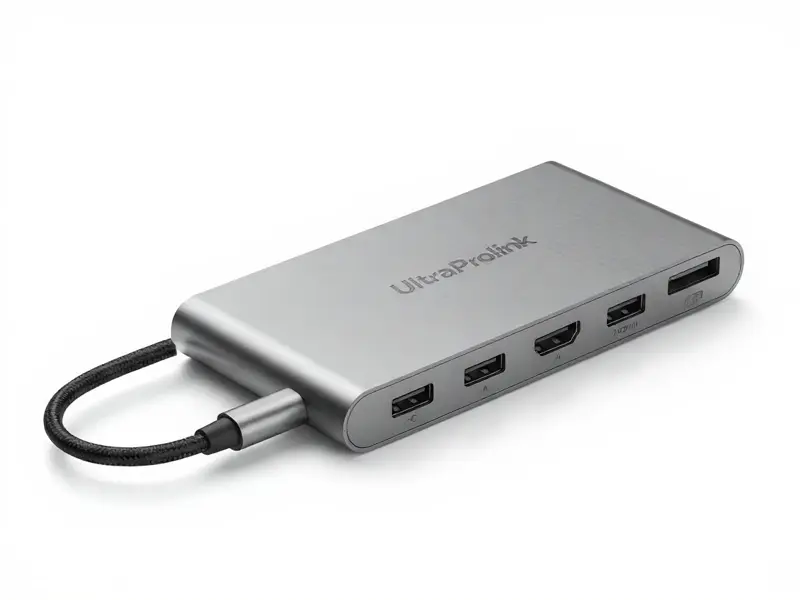
Modern laptops are slim. Tablets are even slimmer. However, this design trend eliminates ports. There may only be one USB-C port included with an iPad Pro or MacBook. That is insufficient for work. People need to connect monitors, hard drives, keyboards, and even wired internet. Ultraprolink usb c hub step in for this situation.
These little gadgets turn one port into many. UltraProlink, a trusted Indian brand, makes hubs that stand out. They are sleek, reliable, and practical. In this blog, we explore their design, features, and benefits under five clear headings.
Sleek, Plug-and-Play Design of Ultraprolink usb c hub
UltraProlink builds hubs with aluminum bodies. The finish looks premium and feels solid. Additionally, aluminum keeps heat under control. That’s important because many hubs get hot with heavy use.
The design is portable and small. You can slip one into a laptop bag or even a pocket. This makes them perfect for students, travelers, and professionals. Instead of carrying several adapters, you carry just one hub.
Setup is easy. These hubs can be set up in minutes. You don’t install drivers or apps. Connect and utilize immediately. They work with Windows, macOS, Android, iPadOS, and Samsung DeX. That makes them versatile. You can switch between a laptop and a tablet in seconds.
The design matches the latest gadgets. Sleek edges, lightweight design, and a neat cable make them blend with premium laptops. The design shows UltraProlink thought about both looks and function.
Core Features: HDMI, Power Delivery, and High-Speed USB
Even the smallest UltraProlink hub packs strong features. The Smart Hub 3-in-1 (UM1044) comes with three essentials.
It has a 4K HDMI port. It includes a USB 3.0 port with 5Gbps speed. And it offers 100W Power Delivery pass-through.
This trio covers daily needs. You can connect a projector through HDMI. We can transfer data quickly through USB.
Can also charge our laptop without losing power. Imagine giving a presentation. Your hub connects the projector, runs a USB stick, and charges your device—all at once.
The Smart Hub 4-in-1 (UL1206) adds one more USB 2.0 port. That lets you connect a keyboard or mouse while keeping the faster USB 3.0 free.
Need more? The Smart Hub 5-in-1 (UL1207) gains additional capacity. Wired Ethernet (10/100 Mbps) is added. This is useful in hotels and offices where the Wi-Fi is unstable. You get steady internet and fast downloads.
For video calls or streaming, that makes a big difference.
These hubs show a smart balance. They don’t overload you with features. They give exactly what most users need every day.
Legacy Ports of Ultraprolink usb c hub
Sometimes one or two USB ports are not enough. Gamers, coders, and video editors frequently connect multiple devices simultaneously. They may need a mouse, keyboard, external drive, and camera connected together.
They can get the SLimport 4C (UL1205) from UltraProlink. This hub has four full-size USB ports. One is USB 3.0 for fast data. The other three are USB 2.0 for peripherals. It still includes HDMI and Power Delivery. It basically turns a slim ultrabook into a desktop setup.
There’s also the iExpand UL1054. This one focuses only on USB expansion. It has four ports for USB 3.0. All ports support up to 5Gbps speed. It even works with OTG on smartphones and tablets.
Photographers love this feature. They can connect an Android phone to the hub. After that, they connect a flash drive or card reader. They back up photos on the go without opening a laptop.
UltraProlink adds small touches too. The iExpand has a flexible cable and an LED light. On a desk that is cluttered, these make it easier to use. It’s clear the brand thought about user comfort.
High-Capacity Modular Hub: The Mega Hub UL1024
Some users want everything in one hub. The Mega Hub UL1024 was developed by UltraProlink for them. This is an 8-in-1 modular hub. It packs almost every port you could want.
It includes the following:
- HDMI with 4K support
- Gigabit Ethernet for stable internet
- SD and TF card readers
- Three USB 3.0 ports
- Two ports for USB-C 3.1
- One 87W Power Delivery port
The special feature is its modular design. You can detach parts of the Ultraprolink usb c hub or Type C Hub when you don’t need them. At home, you can use the full setup. While traveling, you carry just the modules you need. That gives professionals maximum flexibility.
The aluminum build matches MacBooks and other premium laptops. It looks sleek, but it’s also tough. More importantly, it supports high-wattage charging. A 15-inch MacBook Pro can be charged quickly. This hub is perfect for creative professionals. Graphic designers, photographers, and video editors can connect multiple drives, card readers, and monitors at once. They no longer need separate adapters. One hub does it all.
Smart Workflow Solutions
Ultraprolink usb c hub or we can say UltraProlink Type C Cable is more than just ports. They improve workflow. Each hub fits a real-world scenario.
- The Ethernet 5-in-1 hub is reliable for remote workers. It keeps video calls smooth even when Wi-Fi is weak.
- Students can use the 3-in-1 hub for presentations. They stay charged, connect to projectors, and plug in USB drives without stress.
- Frequent travelers find the 4-in-1 hub ideal. It’s small but powerful enough to handle daily tasks.
- Creators love the Mega Hub UL1024. It handles external monitors, multiple storage devices, and card readers at once.
Time is saved by using one hub. Instead of juggling multiple dongles, you connect one device. It keeps your desk clean and reduces cable mess. This boosts focus and productivity.
The hubs also bring peace of mind. During work, your device never loses power thanks to Power Delivery. With HDMI, you can extend your screen instantly. With Ethernet, you avoid sudden Wi-Fi drops. These small wins add up to smoother workdays.
So, UltraProlink USB-C hubs demonstrate the importance of design. They are stylish, strong, and slim. Due to their plug-and-play setup, they are simple to use.
Additionally, they cater to students as well as professionals. Choose a 3-in-1 or 4-in-1 hub if you need a basic one. If you want Ethernet, pick the 5-in-1. Try the SLimport 4C or the iExpand UL1054 if you need multiple USB ports.
Additionally, the Mega Hub UL1024 is the best option if you want everything in one place. By choosing the right hub, you unlock your device’s full power. Your slim laptop or tablet turns into a productivity machine. You work faster, stay organized, and connect without limits.
In a nutshell, UltraProlink hubs eliminate the greatest problem that modern devices face—a lack of ports. They grant freedom, adaptability, and tranquility of mind. For anyone who values smooth workflows, they are a smart investment.