Irusu VR Headset Review: Is It Worth Buying for Beginners?
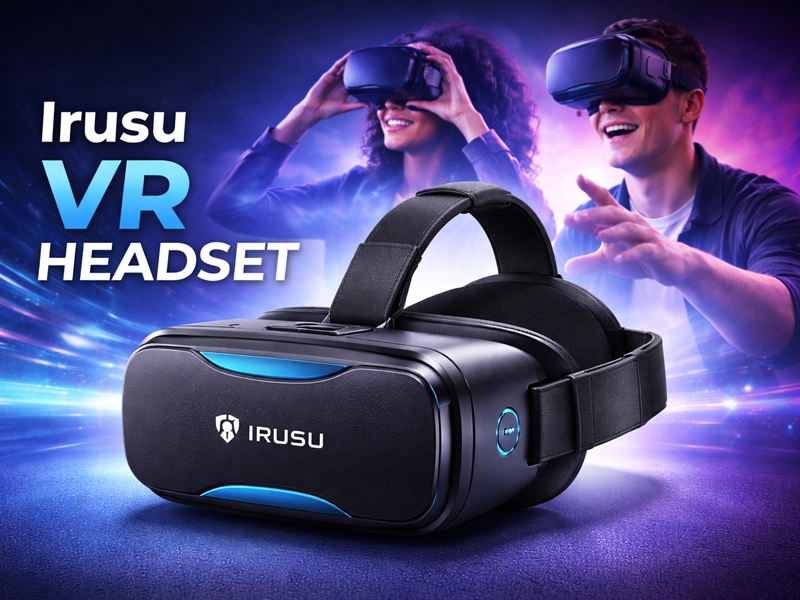
The Irusu VR Headset is an affordable device that lets you experience virtual reality using your smartphone. It is mainly designed for watching 360-degree videos, playing simple VR games, and exploring virtual environments.
Virtual reality is becoming more popular, but many high-end VR devices are expensive. This is where budget options like the Irusu Play VR Plus come in. It gives users a chance to try VR without spending too much money. But how well does it actually perform in everyday use? Let’s look at it in detail.
Design and Build Quality OF Irusu vr headset
This VR headset comes with a simple and practical design. It is made of plastic, which helps keep it lightweight and easy to handle.
The front section is designed to hold your smartphone securely. It has adjustable straps that allow you to wear it comfortably on your head. The padding around the eyes helps reduce pressure and improve comfort during use.
It feels reasonably sturdy and holds up well considering what you’re paying for. It may not feel very premium, but it is strong enough for regular indoor use. If handled properly, it can last for a long time.
Overall, the design is simple, functional, and suitable for beginners.
Compatibility and Setup
One of the best things about the Irusu VR headset is its wide compatibility.
Works with most smartphones
Supports Android and iOS devices
Compatible with many VR apps and videos
The setup process is very easy:
Place your smartphone inside the headset
Open a VR app or 360 video
Adjust the lenses for a clear view
You don’t need any technical knowledge to get started. It’s designed so that anyone, even a beginner, can set it up quickly without any hassle.
This makes it a great option for beginners who are new to VR.
Visual Experience of Irusu vr headset
The VR headset uses optical lenses to create a virtual reality effect. These lenses help improve the viewing experience.
Adjustable focus
Decent field of view
Supports 3D and 360-degree content
The overall experience depends on your smartphone. A phone with a high-resolution display will provide better visuals.
The clarity is good for a budget device, but it is not comparable to high-end VR systems.
It provides a basic but enjoyable VR experience.
Performance in Real Use
In real-world usage, the Irusu VR headset works well for basic VR activities.
You can use it for:
Watching VR videos
Playing simple games
Exploring virtual tours
The performance depends on your phone’s capabilities. A phone with a gyroscope sensor is required for proper VR experience.
If your phone is powerful enough, the experience will feel smooth and enjoyable. Otherwise, you may notice some lag.
It is best suited for casual use rather than advanced VR gaming.
Comfort and Usability of Irusu vr headset
Comfort is important for any VR device, and the Irusu Play VR Plus games offer a decent level of comfort.
Adjustable head straps
Lightweight design
Soft padding
You can wear it comfortably for short sessions. However, using it for a long time may cause slight discomfort or pressure around the eyes.
It is ideal for short entertainment sessions.
Features and Controls
The headset comes with basic features that improve usability:
Built-in touch button
Adjustable lenses
Support for external controller
The touch button can be used to interact with certain apps. Some versions also support a controller, which makes navigation easier.
The controls are simple and easy to understand.
Battery and Power Usage
The Irusu VR headset does not require its own power source. It works using your smartphone.
However:
Your phone battery will drain faster
Controllers (if included) may need batteries
This is normal for mobile VR devices.
Daily Usage Experience of Irusu vr headset
In everyday use, the Irusu Play VR Plus performs well for entertainment.
Easy to use
Quick to set up
Fun for short sessions
This works best indoors, where you can sit comfortably and enjoy VR content. It is not meant for outdoor or heavy use.
It is perfect for casual entertainment and trying VR for the first time.
In addition, the headset is easy to carry and store when not in use, which makes it convenient for regular handling. Users can quickly switch between different VR apps and videos without any complicated steps. This adds to the overall ease of use and makes the experience more enjoyable for beginners.
Comparison with Other VR Devices
When compared to high-end VR systems:
Irusu VR is much more affordable
Does not require expensive hardware
Limited features compared to advanced VR
High-end devices offer better graphics and performance, but they are also much more expensive.
This is a good entry-level option for beginners.
Pros and Cons of Irusu vr headset
Pros:
- Affordable price
- Easy to use
- Works with most smartphones
- Lightweight and comfortable
- Good for beginners
Cons:
- Depends on smartphone quality
- Basic build quality
- Limited features
- Not suitable for long sessions
Who Should Buy This?
This is a good choice for:
Beginners
Students
Casual users
Budget buyers
It may not be suitable for:
Professional VR users
Advanced gamers
Users expecting high-end performance
Frequently Asked Questions
Q. Is the Irusu VR headset good for beginners?
A. Yes, it is simple to use and ideal for beginners.
Q. Does it work with all phones?
A. It works with most smartphones that support VR features.
Q. Is it comfortable?
A. Yes, but it is best for short sessions.
Q. Does it need charging?
A. No, it uses your smartphone.
Q. Is it worth buying?
A. Yes, if you want a budget VR experience.
The Irusu VR headset is a simple and affordable way to explore virtual reality. It offers basic features, easy setup, and a decent experience for beginners.
It may not be built for high-end performance, but it still offers solid overall value for the money.
Final recommendation:
If you want to try VR without spending too much money, the Irusu VR headset is a good option. It is best suited for casual use and beginners.
Author
Written by Pallavi Sharma
Pallavi Sharma is a tech content writer who focuses on gadgets and accessories. She provides clear and simple insights to help users make better decisions.