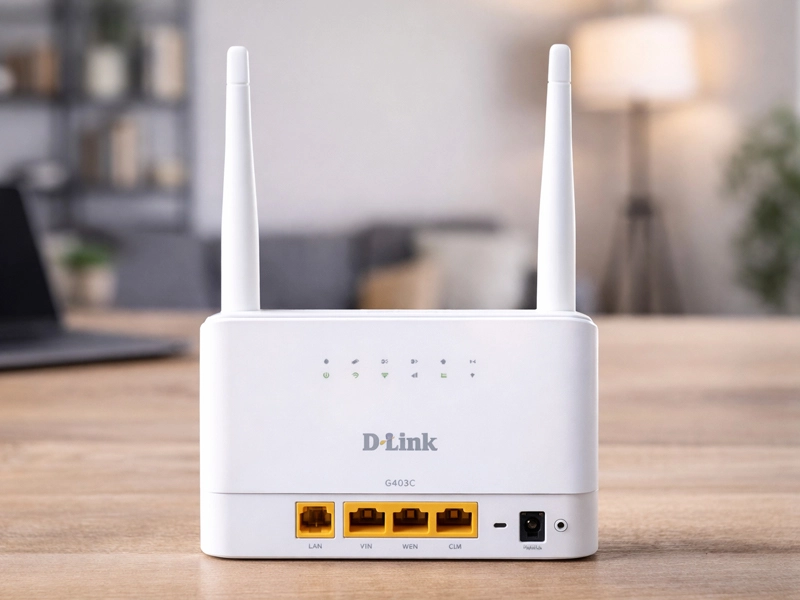
Without the need for fixed broadband lines, the D-Link G403C Modem provides high-speed 4G LTE internet to homes, small offices, travelers, and even temporary setups like vacation homes.
From laptops to smart TVs, this small router turns a simple nano SIM card into a powerful Wi-Fi network that can simultaneously support up to 32 devices. With its four external 5dBi antennas boosting signal strength across challenging environments, users enjoy smooth 4K streaming, lag-free online gaming, and seamless video conferencing even in rural or semi-urban areas where fiber lags behind.
Gadgetspros highlights this device as a game-changer for those seeking cable-free internet solutions that prioritize speed, security, and plug-and-play simplicity in everyday scenarios, saving hundreds on installation fees while delivering enterprise-grade reliability right out of the box.
Why Use the D-Link G403C Modem for Continuous Internet Access?
You choose the D-Link G403C Modem because it automatically switches to 4G LTE backup during broadband outages, eliminating downtime and allowing for uninterrupted workflows.
This modem delivers download speeds up to 150 Mbps. It supports smooth video calls and fast file downloads. It works well for homes with multiple devices. Why depend on wired connections that can get damaged or disrupted?
Its strong performance handles up to 32 users at once without slowing down. It suits families managing remote work, online classes, streaming, and smart devices like security cameras.
Rural users and cabin owners can enjoy city-level internet without satellite issues. Small businesses in non-metro areas can avoid expensive fibre installations that take months to set up
It is a no-brainer upgrade for budget-conscious tech enthusiasts because the energy-efficient design and low power draw keep running costs under $5 per month on average for data plans. This delivers exceptional value that surpasses traditional modems in terms of flexibility, portability for road trips, and consistent performance during peak hours.
Unboxing and First Impressions of the D-Link G403C Modem
Unboxing the D-Link G403C Modem reveals a sleek white device packed with four external 5dBi antennas that promise superior coverage right out of the box. Inside, you find a nano SIM slot, power adapter, Ethernet cable, and quick start guide for hassle-free D link g403c modem setup.
LED indicators for power, internet, Wi-Fi signal strength, and WAN status glow clearly, confirming instant status checks at a glance. Power it on, insert your SIM, and watch the 2.4GHz N300 Wi-Fi network activate within minutes—no tech expertise required. The robust construction with ventilated casing feels high-end and dissipates heat, immediately instilling confidence in its capacity to handle demanding home networks or pop-up offices without becoming overheated over time.
How to Easily Configure
Setting up the D-Link G403C Modem begins with plugging in the power adapter and inserting a nano SIM card into the dedicated slot—ensure the device powers off first to avoid errors or SIM detection issues.
Connect via Ethernet to one of three Fast LAN ports or join the default Wi-Fi network printed on the label. Access the web interface at 192.168.0.1 using admin credentials, then configure APN settings from your carrier for optimal LTE bands like B1, B3, B40, or B41—double-check data limits to prevent overages. Enable WPA3 security, set up guest Wi-Fi for visitors, and customize SSID for branding.
Speedtest.net can be used right away to test speeds; if the signal becomes weaker, move the antennas upward or toward the tower closest to you and enable band locking for stability. For advanced users, activate SMS management via the app for remote reboots or usage alerts. If connection drops, perform a 30-second reset and re-enter APN. In less than ten minutes, you can be online, ready for streaming, remote work, or even as a mobile hotspot while traveling.
Key Design Features
The D-Link G403C Modem excels through German-engineered antennas with 2x for LTE and 2x for Wi-Fi, extending coverage up to 1500 sq ft without dead zones in apartments or small villas.
Its compact 222x147x42mm frame includes a versatile WAN/LAN port for hybrid broadband-4G setups, plus WPS one-touch pairing and reset buttons for quick device additions. Stateful packet inspection firewall, DoS protection, and WPA3 encryption all prevent sophisticated threats, and EN 303 645 certification guarantees enterprise-level cyber safety.
Multi-band LTE support from B1 to B41 adapts to global carriers seamlessly, including Indian Jio and Airtel networks. TR-069 remote management, QoS prioritization for gaming/video, and reliable N300 speeds on 2.4GHz make it a versatile hub for modern connectivity requirements in a variety of settings.
Comparison: D-Link G403C Modem vs. Leading Competitors
In terms of features and real-world dependability, the D-Link G403C Modem outperforms budget rivals. The D-Link Archer MR200 has stronger 5dBi antennas than the TP-Link Archer MR200 (which costs the same $50) and does not have WAN failover like the TP-Link. According to user tests, the D-Link also handles 32 devices faster than the TP-Link Archer MR200.
Compared to the pricier Huawei B535 (around $120), D-Link matches 150Mbps LTE Cat4 downloads but adds easier SIM setup, more LAN ports, and superior Indian band support at half the cost—ideal for Jio/Airtel users. Netgear’s LM1200 provides portable 4G but caps at 10 devices versus D-Link’s 32, lacking robust security like WPA3 and wired options for desktops.
The GL.iNet GL-MT300N-V2 emphasizes travel with VPN but falls short on wired ports, signal strength in basements, and multi-user capacity. On congested networks, where competitors drop to 60Mbps, D-Link maintains speeds of over 100Mbps in speed tests. For home, office, or backup use, the D-Link G403C Modem achieves the best balance between price, ports, performance, and future-proofing.
Maintenance Guidance for Optimal D-Link G403C Modem Performance
Keep your D-Link G403C modem manual guidelines in mind to maintain peak performance. Clean the antennas monthly with a soft microfiber cloth to preserve signal clarity. Avoid using liquids near ports or vents.
Update the firmware every three months through the web interface or auto-update feature. This strengthens security, improves LTE performance across bands, and supports new carrier profiles.
Check the LED indicators regularly for signs of overheating or a weak signal. Place the modem in a well-ventilated area away from direct sunlight, microwaves, and thick walls.
If internet speeds drop, restart the device once a week. You can also switch SIM slots during dual-carrier testing or use the built-in diagnostics to detect interference.
This routine maintenance helps prevent common issues such as firmware glitches and signal interference. It keeps your connection stable and secure.
You can enjoy consistent 50Mbps uploads, firewall-protected browsing, and dependable failover support, especially in areas prone to power outages.
Frequently Asked Questions
Q. What speeds does this deliver on 4G LTE?
A. It supports Cat4 LTE with up to 150 Mbps downlink and 50 Mbps uplink, ideal for HD streaming across 32 devices.
Q. Is it simple to set up the this Modem for novices?
A. Yes, simply insert a nano SIM, power on, and connect—the web UI guides APN and Wi-Fi customisation in minutes.
Q. Does this have WAN failover capabilities?
A. Absolutely, it auto-switches between broadband WAN and 4G SIM for zero-downtime connectivity during outages.
Q. How many devices can connect simultaneously to the D-Link G403C Modem? . A. Up to 32 via Wi-Fi, with three LAN ports for wired stability in busy households or small offices.
Q. What security features safeguard the network of the D-Link G403C Modem?
A. WPA3 encryption, guest Wi-Fi, a firewall, IP/MAC filtering, and EN 303 645 certification safeguard against threats.