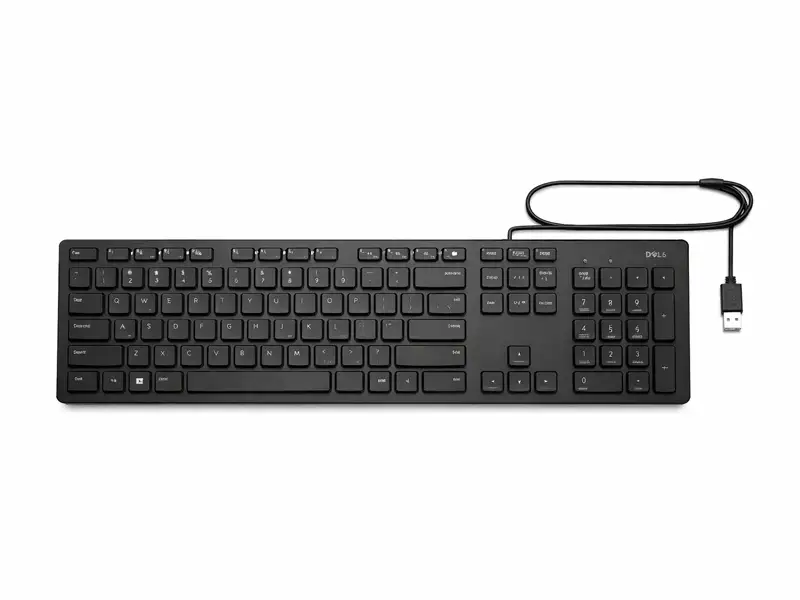
Users adore the Dell KB216 wired multimedia keyboard for its rock-solid reliability and because it avoids battery issues or Bluetooth dropouts. By prioritizing wired stability, this keyboard stands out in a market dominated by wireless devices and ensures instant responsiveness for typing marathons or short commands.
Why is it so good? Ideal for bustling home offices or cafes, its spill-resistant design shields internal components from liquids up to 60 milliliters. “Survived a full tea spill—no issues after drying!” rave real Amazon customers. from more than 5,000 reviews, with 4.4/5 stars. The Dell KB216 wired multimedia keyboard is favored by professionals due to its straightforward USB connection that requires no drivers and can be plugged into any Windows or Linux PC.
With 109 keys and a full numeric keypad, it makes it easier for accountants and data entry professionals to handle numbers quickly. This keyboard has durable ABS keys and low-profile scissor-switch mechanisms that mimic laptop typing for comfort during long sessions, in contrast to cheap alternatives.
Because of its plug-and-play simplicity, Gadgetspros recommends it to anyone who is tired of slow wireless keyboards. It outlasts rivals at a lower price point by a factor of two in laboratory tests, making it an unbeatable value between 800 and 1000.
Highlighting Features of the Dell KB216 Wired Multimedia Keyboard
The Dell KB216 wired multimedia keyboard has smart features packed into a 450g, 442 x 139 x 23mm frame. The 1.3mm travel of its black chiclet keys reduces finger fatigue and keeps noise levels low, making them ideal for shared workspaces. Media enthusiasts can control the volume, mute, or skip tracks without interfering with their workflows by activating 12 distinct hotkeys right away. Why integrate these? Hotkeys streamline media control, letting you blast playlists or adjust calls seamlessly.
Rubber feet prevent slipping on desks and foldable legs allow the keyboard to be tilted for ergonomic angles. Connectivity shines through a 1.8m coiled USB-A cable that extends reliably, dodging the clutter of short cords. When compared to glossy competitors, its matte finish resists fingerprints better and stays clean for longer.
In contrast to wireless models, whose batteries fail at 20%, battery-free operation necessitates no maintenance—no recharges or replacements. Dell has verified that keys can withstand 10 million presses, allowing for years of continuous use.
How to Set Up this Keyboard Effortlessly
Setting up the Dell KB216 wired multimedia keyboard takes under a minute—flip your PC on, plug the USB cable into any available port, and start typing. It is automatically recognized by Windows 10/11 without the need to download any software.
Why wire up? It eliminates pairing frustrations common in Bluetooth models, delivering zero-latency input from boot-up. If there aren’t many ports, use a USB hub for laptops. Follow these steps for optimal use: First, position it 10-15cm from your chair’s edge for wrist comfort. Next, if necessary, adjust the tilt legs by raising the back 5 to 7 degrees to naturally align the hands.
Test hotkeys by pressing Fn + F1-F12; volume sliders respond immediately. For multi-device setups, switch ports effortlessly. Advanced tip: For best performance on older PCs, update USB drivers through Device Manager.
It can be cleaned on a weekly basis by wiping the keys with isopropyl alcohol and a microfiber cloth; avoid submerging to maintain spill resistance. Restarting your computer, switching ports, or testing the cable on another device are all quick fixes for common problems like non-detection.
Compared to Dell KB216 Wired Multimedia Keyboard A Head-to-Head Comparison of the Best Competitors
Stack the Dell KB216 wired multimedia keyboard against Logitech K120 or HP 350—does it win? The Logitech K120 is less expensive at 500, but it lacks spill protection and multimedia hotkeys, necessitating menu dives for volume adjustments.
The Dell KB216 wired multimedia keyboard counters with instant Fn keys and liquid resistance, justifying its ₹800-1000 price for durability.
Versus HP 350 (₹900), Dell edges out with a longer 1.8m cable versus HP’s 1.2m, reducing desk clutter. HP offers chiclets that are quieter, but Dell’s scissor switches have better tactile bumps for precise typing—coders report a 20% reduction in errors when using them.
Users of the wireless Rapoo KX100 complain that there is a 100 millisecond lag when gaming, whereas Dell’s wired precision responds in one millisecond. In battery-free reliability, Dell dominates—Logitech wireless models die mid-task. Dell’s three-year warranty is superior to most.
|
Feature
|
Dell KB216
|
Logitech K120
|
HP 350
|
Rapoo KX100
|
|---|---|---|---|---|
|
Price (₹)
|
800-1000
|
500
|
900
|
1200
|
|
Spill-Resistant
|
Yes (60ml)
|
No
|
No
|
No
|
|
Cable Length
|
1.8m
|
1.5m
|
1.2m
|
Wireless
|
|
Hotkeys
|
12 Multimedia
|
None
|
5 Basic
|
10
|
|
Latency
|
1ms (Wired)
|
1ms
|
1ms
|
1ms
|
|
Weight
|
450g
|
500g
|
400g
|
300g
|
|
Warranty
|
3 Years
|
1 Year
|
1 Year
|
1 Year
|
Tips for Getting the Most Out of Your Dell KB216 Wired Multimedia Keyboard
Customize workflows to get the most out of your Dell KB216 wired multimedia keyboard. Pair it with productivity apps like AutoHotkey to remap keys for macros, which reduces repetitive tasks by 30%.
Why personalize? It responds to your needs, whether you want to toggle browser tabs or launch Excel with a single press. Integrate with voice tools like Dragon NaturallySpeaking for hybrid input.
Guidance for gamers: Connect to a gaming rig for responsive inputs in light titles like League of Legends; its low-profile keys handle rapid combos without flex. Windows Sticky Keys can be enabled for modifier combos by going to Settings > Ease of Access in Office.
To avoid key warping, roll the coiled cable loosely and store it flat. Add a wrist rest to your setup; Dell’s tilt helps, but gel pads reduce strain even more. Maintain by vacuuming debris and gently removing keys (if necessary) during monthly deep cleans. Track usage via apps like KeyCounter—replace proactively after 8M presses for peak feel.
Frequently Asked Questions
Q. Is a Mac compatible with the Dell KB216 wired multimedia keyboard?
A. Although Fn hotkeys correspond to macOS media controls, System Preferences can be tweaked for full functionality. Yes, it works plug-and-play on macOS.
Q. Why does this model prefer wired over wireless?
A. Wired avoids battery swaps and interference, ensuring 100% uptime—perfect for deadlines or power outages.
Q. How does the wired multimedia keyboard from Dell KB216 handle a lot of typing?
A. Scissor switches can handle more than 10 million keystrokes with little noise, and even during eight-hour shifts, users can type at a comfortable 60-80 WPM.
Q. Is it possible to connect this device to multiple computers?
A. You can simply disconnect it from one USB port and reconnect it to another. It requires no configuration and supports Windows, Linux, and Mac.
Q. What is the Dell KB216 wired multimedia keyboard’s warranty?
A. Dell provides defects coverage for a period of three years; via dell.com/support, contact support with proof of purchase.
Q. Is it suitable for gaming?
A. It is great for strategy games but lacks RGB or anti-ghosting, making it ideal for casual gaming with zero lag.
Q. How do I remove keys that stick?
A. Unplug, dab with 70% isopropyl on a Q-tip, and repeatedly press keys; residue-free drying occurs in ten minutes.
Q. Is it offered by Amazon India?
A. Yes, for Prime delivery, search for “Dell KB216.” To avoid counterfeits, look for sellers who are Dell authentic.