By Chetanya Sarraf
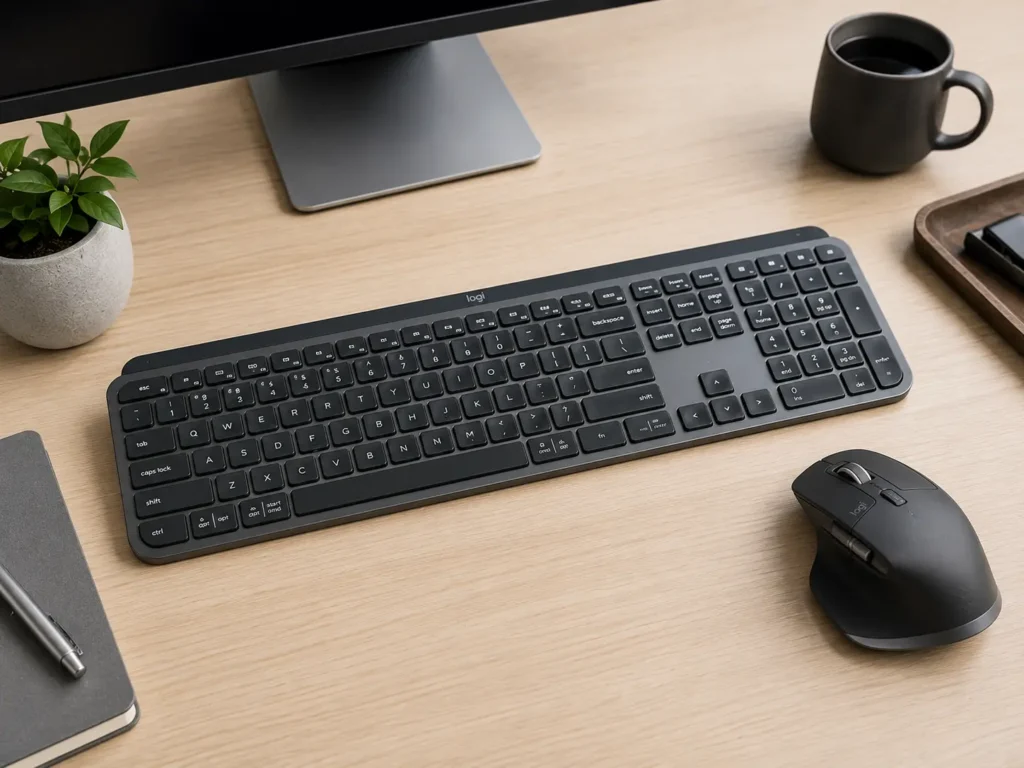
Logitech MX Keys S Keyboard
Choosing the right keyboard can significantly improve productivity, comfort, and overall workflow. Whether you’re writing reports, coding, designing graphics, editing videos, or managing spreadsheets, a premium keyboard can make long working hours more comfortable and efficient. Modern professionals expect responsive keys, wireless connectivity, smart shortcuts, and durable construction to support their daily tasks across multiple devices. The Logitech mx keys s Keyboard is designed for professionals, students, and creators who need a reliable typing experience without compromising comfort or performance.
Its premium build, intelligent features, and versatile compatibility make it a strong option for both office work and home setups.
Designed for Comfortable and Accurate Typing
A keyboard should provide a natural typing experience that minimizes fatigue during extended work sessions.
Well-spaced keys, comfortable key travel, and a sturdy frame help improve typing accuracy while reducing strain on the hands. A thoughtfully designed keyboard also supports better posture and faster workflow, making it easier to stay productive throughout the day.
The Logitech mx keys s Keyboard offers a refined typing experience with responsive keys engineered for precision and consistency. Whether you’re drafting emails, programming software, or writing lengthy documents, comfortable typing can enhance productivity and reduce errors.
Comfort remains one of the most important factors when selecting a premium keyboard.
Smart Features of Logitech mx keys s that Improve Productivity
Modern users often work across multiple devices throughout the day.
A keyboard that supports seamless switching between computers, tablets, and smartphones can simplify multitasking and eliminate unnecessary interruptions. Customizable shortcuts, intelligent backlighting, and wireless connectivity further enhance convenience for professionals working in different environments.
Many buyers also explore the Logitech MX Keys S Combo, which pairs the keyboard with a compatible mouse to create a complete productivity setup. Combining both devices allows users to enjoy a more streamlined workflow across various operating systems and applications.
A feature-rich workspace often leads to greater efficiency.
Connectivity and Multi-Device Compatibility
Today’s professionals increasingly rely on the convenience of wireless connectivity.
Reliable Bluetooth connectivity helps reduce cable clutter while allowing users to switch between multiple devices with minimal effort. Compatibility with Windows, macOS, Linux, ChromeOS, iPadOS, and other supported platforms makes premium wireless keyboards suitable for a wide variety of work environments.
Before making a purchase, many users compare the Logitech MX Keys S price to evaluate whether its premium features justify the investment. Comparing specifications alongside pricing helps buyers identify the best value for their productivity needs.
Reliable connectivity ensures a smooth and uninterrupted working experience.
Build Quality and Everyday Performance of Logitech mx keys s
A premium keyboard should deliver consistent performance for years of daily use.
Durable materials, stable construction, and responsive keys contribute to long-term reliability. Quiet typing is another advantage, especially for professionals working in shared offices, libraries, or home environments where minimal noise is appreciated.
Reading a Logitech MX Keys S review helps buyers understand real-world experiences related to typing comfort, battery life, software integration, and overall reliability. User feedback often provides valuable insights that complement official product specifications.
Consistent performance makes a noticeable difference during everyday work.
Choosing the Right Version for Your Workspace
Before investing in a premium keyboard, it’s important to evaluate compatibility, software features, battery performance, ergonomics, and overall build quality. Choosing a keyboard that integrates seamlessly with your workflow can improve productivity while reducing unnecessary distractions during long work sessions.
Some buyers specifically look for the Logitech MX Keys S keyboard graphite edition because of its professional appearance and ability to complement modern office setups. Selecting a finish that matches your workspace can create a cleaner and more cohesive desk environment.
The Logitech mx keys s Keyboard combines premium design, intelligent features, and dependable performance, making it an excellent choice for professionals seeking an efficient typing solution.
Long-Term Value for Professionals
Investing in a high-quality keyboard can provide benefits that extend well beyond daily typing. Premium keyboards are built with durability in mind, allowing them to withstand years of regular use while maintaining consistent performance. Features such as rechargeable batteries, intelligent power management, and software customization contribute to a better long-term ownership experience.
Professionals who spend several hours each day at their desks can also benefit from improved ergonomics and quieter operation, creating a more comfortable working environment. Whether you’re managing business tasks, editing creative projects, attending virtual meetings, or studying online, choosing dependable input devices can improve efficiency and reduce fatigue over time. A reliable keyboard is not only an accessory but also an investment in productivity and everyday comfort.
Modern professionals also appreciate accessories that support an organized and distraction-free workspace. A premium keyboard with dependable wireless performance, responsive keys, and efficient battery management can simplify everyday tasks while maintaining consistent performance. Choosing quality peripherals helps improve productivity, enhances user comfort, and delivers long-term value for both personal and professional use.
Pros and Cons of Logitech mx keys s
Pros
- Premium build quality
- Comfortable and accurate typing experience
- Wireless multi-device connectivity
- Smart productivity features
- Rechargeable battery with long usage
Cons
- Higher price than standard keyboards
- Advanced features may require compatible software
- Premium functionality may exceed casual users’ needs
Final Thoughts
The Logitech MX Keys S Keyboard is a premium option for professionals, students, and content creators who value a comfortable and efficient typing experience. Its comfortable key layout, intelligent features, durable construction, and seamless multi-device connectivity make it well suited for modern work environments. Before purchasing, compare compatibility, software support, battery performance, and available features to ensure it meets your workflow requirements. Investing in a quality keyboard today can improve productivity, comfort, and overall efficiency for years to come.
FAQs
- Is the Logitech MX Keys S Keyboard suitable for office work?
Yes. It is designed for professionals who require comfortable typing, reliable wireless connectivity, and productivity-focused features.
- Can it connect to multiple devices?
Yes. It supports multi-device connectivity, allowing users to switch between compatible devices efficiently.
- Is the Logitech MX Keys S Keyboard good for programmers and writers?
Yes. Its responsive keys, comfortable layout, and quiet typing experience make it suitable for coding, writing, and extended work sessions.
- What should I consider before buying a premium keyboard?
Compare compatibility, typing comfort, battery life, software features, wireless connectivity, warranty, and overall build quality before making your purchase.