By Chetanya Sarraf
Acer Swift Neo 14
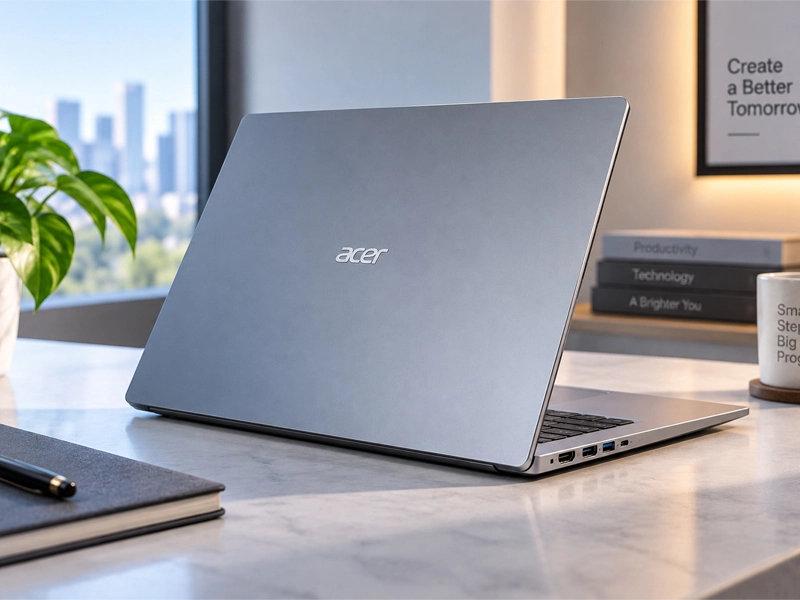
Acer’s laptop (Acer Swift Neo 14) targets users who want a lightweight Windows laptop with performance. It combines Intel Core Ultra processors, a 14-inch display, fast SSD storage in a body weighing about 1.25kg. That balance makes it appealing for students, office users and professionals who move between locations.
A compact laptop with a practical screen
The 14-inch WUXGA display offers 1,920 x 1,200 resolution and a 16:10 aspect ratio, providing useful vertical space for documents, websites and productivity apps. Select configurations also offer OLED panels, giving buyers another option depending on budget and priorities.
Performance for everyday work
Depending on the configuration, the laptop uses Intel Core Ultra 5 or Core Ultra 7 H-series processors with integrated Intel Arc graphics. The refreshed range can offer up to 32GB of memory and 1TB SSD storage.
That hardware is suited to browsing, presentations, spreadsheets, coding, video meetings and moderate creative tasks. Higher-memory configurations are useful for people who keep numerous browser tabs and applications open simultaneously.
Acer Swift Neo 14 price in India
The starting price in India is ₹67,999 for the base configuration listed in September 2026. Higher-spec versions can cost more, with some Core Ultra 7 models listed around ₹89,990 depending on retailer and availability.
Laptop prices can change with discounts, bank offers and stock levels, so buyers should check the current selling price before ordering.
Portability and connectivity

For buyers comparing configurations, the decision should depend on expected usage over several years. Extra memory can improve multitasking, while a larger SSD provides more room for applications, projects and media. If the laptop is intended for long-term professional use, choosing a stronger configuration at purchase may be more practical than replacing the device sooner.
However, paying for specifications that will rarely be used can reduce value. Students and casual users should focus on reliability, portability, display quality and sufficient storage. Professionals with heavier workloads can justify higher memory and processor options.
It remains easy to carry.
For buyers comparing configurations, the decision should depend on expected usage over several years. Extra memory can improve multitasking, while a larger SSD provides more room for applications, projects and media. If the laptop is intended for long-term professional use, choosing a stronger configuration at purchase may be more practical than replacing the device sooner.
However, paying for specifications that will rarely be used can reduce value. Students and casual users should focus on reliability, portability, display quality and sufficient storage. Professionals with heavier workloads can justify higher memory and processor options.
It remains easy to carry.
At approximately 1.25kg and 17.2mm thick, the laptop is designed for mobility. It can fit into a backpack while still providing enough screen space for regular productivity.
Battery and charging of Acer Swift Neo 14
The laptop uses a 52Wh battery and supports 65W USB Type-C charging. Acer rates battery life at up to eight hours, although real-world results depend on brightness, applications and workload.
Acer Swift Neo 14 review: who should buy it?
A review should focus on its role as a thin-and-light productivity laptop rather than a gaming machine. Its strengths are portability, modern processors, flexible configurations and practical connectivity.
Students can rely on it for research, completing assignments, and attending online classes. Office users can handle documents, spreadsheets and communication tools, while travelers benefit from its lightweight design. Users needing demanding graphics performance should consider a laptop with a dedicated GPU instead.
Cameras, security and everyday comfort
The 1080p webcam is useful for video calls, online learning and remote meetings. A fingerprint reader provides convenient biometric login, while the backlit keyboard helps users work comfortably in dim surroundings.
Acer Swift Neo 14 specs at a glance
The specifications vary by configuration, with options including Intel Core Ultra processors, up to 32GB memory, up to 1TB SSD storage, Intel Arc graphics and Windows 11 Home. Display options include WUXGA IPS panels and OLED versions on select models.
Buyers should check the exact configuration before purchasing because RAM, storage, processor and display specifications can differ between listings.
Pros and Cons
Pros
- Lightweight 1.25kg body
- Modern Intel Core Ultra processors
- Up to 32GB memory
- Useful port selection
Cons
- Base model offers limited memory
- Integrated graphics are not ideal for heavy gaming
- Battery results vary by workload
- Higher configurations cost more
Extra buying considerations
Choosing the right configuration is more important than simply selecting the most expensive model. A user who mainly browses, writes documents and attends online meetings may not need the highest processor or memory option. Spending more on additional RAM and storage makes greater sense for professionals who regularly edit large files, work with demanding applications or keep many programs open.
Display choice also deserves attention. An IPS panel can be a practical option for everyday office work, while an OLED configuration may appeal to users who value deeper contrast and a more visually impressive viewing experience. Buyers should compare the complete specification rather than assuming every model in the range has identical hardware.
Everyday connectivity and workflow
A thin laptop becomes more useful when its ports reduce the need for adapters. The available USB-C, USB-A and HDMI connections make it easier to connect accessories, external storage and larger displays. This can be particularly useful in offices, classrooms and home workspaces where users frequently switch between portable and desktop-style setups.
Wireless connectivity is also important for a modern notebook. Wi-Fi 6 support can provide a more capable connection on compatible networks, while Bluetooth accessories can help users work with wireless mice, keyboards and headphones. These details may seem small, but they contribute to a smoother daily experience.
Is the upgrade worth considering?
For buyers comparing configurations, the decision should depend on expected usage over several years. Extra memory can improve multitasking, while a larger SSD provides more room for applications, projects and media. If the laptop is intended for long-term professional use, choosing a stronger configuration at purchase may be more practical than replacing the device sooner.
However, paying for specifications that will rarely be used can reduce value. Students and casual users should focus on reliability, portability, display quality and sufficient storage. Professionals with heavier workloads can justify higher memory and processor options.
It remains easy to carry.
Final buying advice
Before placing an order, check the processor, RAM, SSD capacity, display type and included charger for the exact model number. Retail listings can use similar names for different configurations, which may create confusion when comparing prices.
Overall, this laptop is positioned as a balanced portable Windows machine rather than a specialist gaming or workstation device. Its combination of mobility, modern processing options and practical connectivity gives it broad appeal for everyday computing.
FAQs
Is it good for students?
Yes. Its lightweight design, 14-inch display, battery rating and productivity-focused hardware make it suitable for classes and assignments.
Does it have an OLED display?
Select configurations offer OLED displays, while other versions use WUXGA IPS panels.
How much RAM can it support?
The refreshed range is available with up to 32GB of memory.
Is it suitable for gaming?
It can handle lighter games, but integrated Intel Arc graphics are better suited to everyday workloads than demanding gaming.