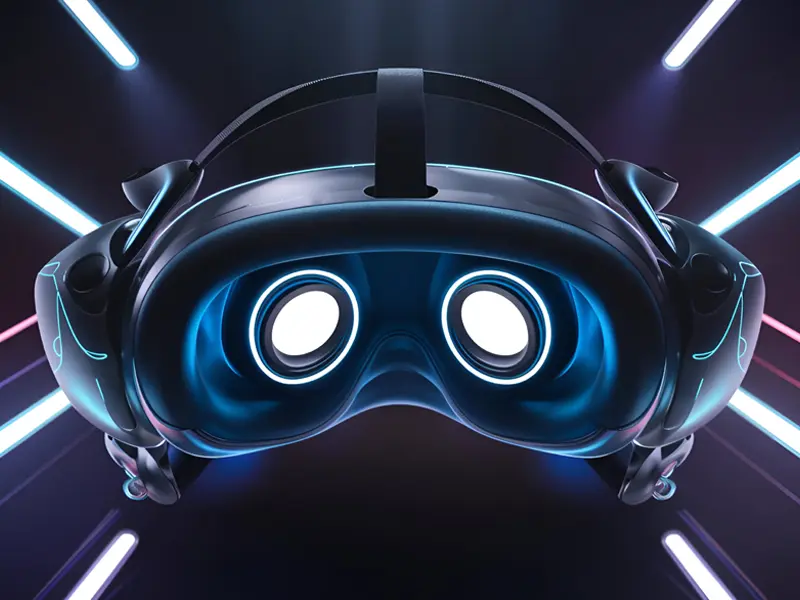
Arcnet V5 VR Headset Review and Buying Guide (2025)
Nowadays, virtual reality isn’t just for gamers. It’s now used for movies, travel, fitness, and learning. The Arcnet V5 VR headset is a great way to get started in virtual reality without breaking the bank.
It is affordable, well-constructed, and works with the majority of smartphones. From design and performance to comparisons, buying advice, and setup steps, this guide covers it all.
It is ideal for people who are just starting out and want a simple, immersive way to explore virtual worlds and view 360-degree content at any time.
Design, Build, and Comfort
The Arcnet V5 has a sleek but solid construction. It looks modern and solid and is made of durable plastic with a matte black finish. The body doesn’t feel flimsy or creak. It feels premium for its price range. The headset includes soft face padding that fits comfortably around your eyes.
The material is breathable and prevents sweating during long sessions. Adjustable head straps make it easy to get the right fit. You can wear it for 30–45 minutes without strain.
It supports phones from 4.7 to 6.7 inches, covering most Android and iPhone models. The design ensures that your smartphone remains secure while in use, and the front lid opens smoothly for easy insertion. The lens adjustment feature is a big plus. To get a clear, sharp view, you can control both the focal distance and the pupil distance. Even users who wear glasses can fine-tune focus easily.
The overall design is user-friendly, lightweight, and comfortable—ideal for new VR users.
Comparison of Arcnet v5 vr headset with Other VR Headsets
Let’s see how the Arcnet V5 compares with the Procus VR, Irusu Play VR, and the premium Meta Quest 3.
Procus VR versus Arcnet V5
Procus VR is a popular option, but the Arcnet V5 feels slightly lighter and clearer. Its lens adjustment is smoother, giving better focus.
The Procus VR’s thicker cushioning makes it easier to use for longer periods of time, but both headsets are comfortable in similar ways. Arcnet V5 leads the pack when it comes to refined design and sharper visuals.
Arcnet V5 vs Irusu Play VR
Irusu Play VR is more gaming-focused. It supports Bluetooth controllers and offers slightly better app integration.
Instead, Arcnet V5 places an emphasis on image clarity and comfort. It is ideal for watching 360-degree content or VR movies. Irusu is better for gaming; Arcnet is better for immersive viewing.
Meta Quest 3 versus Arcnet V5
Meta Quest 3 is a standalone VR headset. It has its own processor, screen, and sensors. A smartphone is not necessary for it. It works with motion controllers, high-end VR games, and hand tracking. Arcnet V5, in comparison, is smartphone-based and much cheaper.
For a fraction of the price, it provides a basic but enjoyable virtual reality experience. If you’re new to VR, Arcnet V5 is the better entry point. Meta Quest 3 is designed for serious VR gamers who desire complete immersion and advanced features.
How to Select the Best Virtual Reality Headset
Before you buy a Arcnet v5 vr headset, check a few key points. These help ensure you get the right fit for your needs.
Phone Compatibility
Make sure your headset supports your phone’s size and sensors. The best phones are those with gyroscope sensors.
Lens Adjustment
Comfort and clarity are significantly improved by lenses that can be adjusted. Arcnet VR headset lets you control both focus and distance.
Building quality
Avoid weak or fragile frames. The Arcnet V5’s strong build ensures durability and long-term use.
Comfort
Look for padding, ventilation, and a lightweight design. You’ll wear it for long periods, so comfort is key.
Cost and Benefits
Don’t choose based on price alone. Take into account visual experience and usability. A slightly higher price often means better design and lenses.
Buying a VR headset is about balance — good visuals, comfort, and reliable build quality. The Arcnet V5 checks all these boxes without costing much.
How to Set Up and Use Arcnet V5 VR Headset
Setting up the Arcnet v5 vr headset takes only a few minutes. Follow these steps:
1: On your smartphone, install a VR-compatible Arcnet vr app like YouTube VR, Fulldive VR, or Google Cardboard.
2: Open a VR video or game inside the app and select the “VR mode” or “split-screen” option.
3: Place your phone inside the headset with the screen facing the lenses by opening the front flap.
4: To ensure a balanced view, center the phone correctly.
5: Securely close the front panel and adjust the straps.
6: Use the focus knobs on the top and sides to adjust clarity.
You can now look around to explore the 360° view. Turn your head slowly for a smooth experience.
Pro Tip: Activate “Do Not Disturb” mode to block calls or notifications while you’re using VR. For the best results, use a microfiber cloth to clean your lenses frequently.
You can also connect Bluetooth earphones or a small controller for added convenience while watching or gaming.
Unique Insights
The Arcnet V5 VR headset stands out in the affordable VR category. It’s simple, comfortable, and effective. The design is thoughtful, the lenses are clear, and the overall experience feels premium for the price.
It is ideal for novices, students, and anyone else who wants to explore VR content without spending a lot of money on expensive equipment. You can watch 360° videos, learn through immersive apps, or even host VR movie nights with friends.
Arcnet v5 vr headset isn’t like some cheap alternatives that feel like toys.
It’s a well-made product that brings real value. Although it lacks Meta Quest 3’s advanced sensors and built-in tracking, it is an impressive piece of technology for less than 2,500 yen. If you’re curious about VR or just want to explore virtual tours and games casually, Arcnet VR headset is worth every rupee. It gives you the freedom to experience VR your way — anytime, anywhere.
Start with Arcnet v5 vr headset, and you’ll understand what virtual reality truly feels like before upgrading to something bigger.