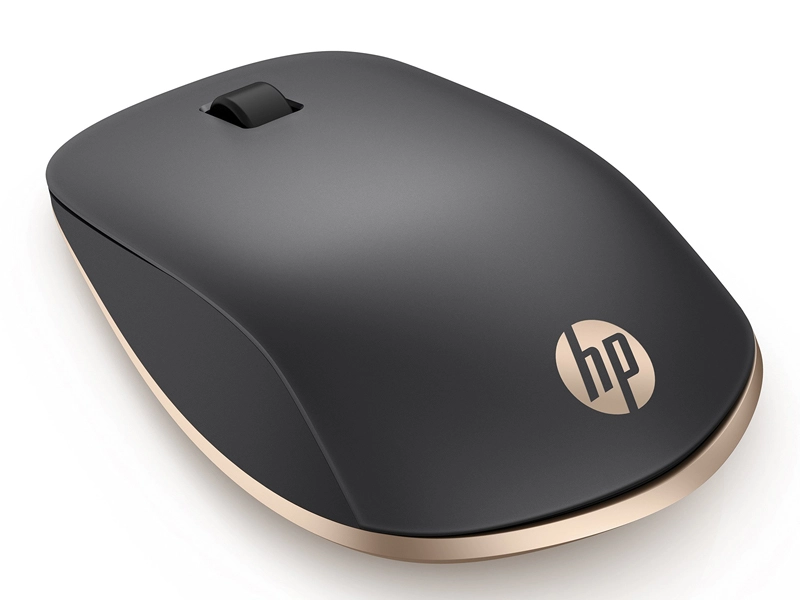
A reliable mouse is important whether you’re setting up a laptop workstation or just want to have a better experience pointing. The HP Spectre mouse is one option that many people think about. It works well in the office, at home, or on the go and is designed to match premium laptops. But is it really worth the money? Let’s dissect it.
The HP Spectre Mouse: What Is It?
The HP Spectre Rechargeable Mouse 700 is a wireless accessory that was designed to be portable and easy to use. It aims to combine premium looks with solid performance, in contrast to standard mice. It connects to laptops using Bluetooth and frequently comes with a USB-A dongle. During everyday work, many users appreciate how crisp and responsive it feels.
The Spectre mouse is designed to be used with laptops like HP’s Spectre series, but it also works with most notebooks with Bluetooth connectivity. It is a good choice for professionals and students who want a mouse that is also useful and looks good because of its stylish design and lightweight.
Design and construction quality
The Spectre mouse’s design is the first thing you notice. It looks good, is small, and feels good in your hand. The minimal design and smooth finish complement contemporary laptop aesthetics well. Unlike bulky gaming mice, this one stays compact and is simple to pack.
Its overall build quality and comfortable grip are frequently praised by users. It’s not too heavy, so it doesn’t make long sessions of clicking and scrolling feel like work. The scroll wheel moves smoothly, and the buttons click well without being flimsy.
However, some customers have mentioned that some button placements require some getting used to. However, the design is effective for most commonplace activities like document editing, presentations, and browsing.
Compatibility and Connectivity of HP Mouse Wireless
The HP Spectre mouse’s ability to pair with multiple devices is one of its most distinctive features. It is useful when switching between a smartphone, tablet, or laptop because it can connect to multiple Bluetooth devices. Additionally, a small USB dongle is included, providing protection in the event that you are working on a laptop that does not support Bluetooth.
Pairing is usually not difficult. The majority of users say that once paired, the connection stays stable without lag or frequent drops. However, because it connects via Bluetooth, it is not the best option for high-intensity gaming that requires a lightning-fast response, but it is more than capable for office and daily use.
Charge Time and Battery Life of Hp spectre mouse
When selecting an HP Mouse Wireless, battery life is an essential consideration. Here, the Spectre mouse does well. The model can be charged in some versions, and depending on how much you use it, you might not need to charge it for weeks. According to one specification sheet, the battery can last up to 11 weeks on a single charge with typical use.
People who don’t want to deal with changing batteries often will find it very convenient because of this. Depending on the model, the rechargeable model usually charges via USB-C or micro-USB, and you can still use it while it charges.
Performance: Use in the Day-to-Day and Productivity
The HP Spectre mouse works well for most regular laptop users, including students, office workers, and content creators. Whether you are browsing web pages or working on spreadsheets, the cursor movement feels accurate, and the sensor tracks well on a variety of surfaces.
The reliable tracking aids in reducing frustration when performing context-intensive tasks like editing lengthy documents or navigating complex spreadsheets. Although it is not intended for competitive gaming, the mouse performs admirably in light casual games.
People who don’t want to mess with extra software or buttons that can be changed are also going to appreciate how easy its feature set is to use. Most of the time, you just need to connect it, and it works.
Pros
Let’s sum up the strengths of the HP Spectre mouse:
- A stylish, high-end design that goes well with expensive laptops.
- A grip that is convenient and suitable for prolonged work sessions.
- Bluetooth connectivity for multiple devices and USB dongle support.
- Battery life that lasts for weeks on a single charge is long.
- Effortless tracking for everyday productivity and computing.
If you’re looking to upgrade from a basic mouse or pair it with a machine like a productivity notebook, these benefits make it an excellent choice.
Cons and Things to Consider
No product is perfect, and the HP Spectre mouse has a few drawbacks to think about:
- It typically costs more than standard wireless mouse, which may not be justified if you only require point-and-click capabilities.
- This may feel limited to gamers who require advanced features like programmable buttons, adjustable DPI, or a high-response sensor.
- A handful of users mention that the scroll wheel and button feel could be better compared with some mid-range competitors.
Those drawbacks are insignificant if your primary requirements are general laptop use, presentations, and casual office work. A more sophisticated mouse, on the other hand, might be what you need for more specialized work, such as gaming or precise design.
Value and Cost For HP Mouse Wireless
The HP Spectre Rechargeable Mouse typically falls into the middle to upper-end price range. It costs less than many alternatives geared toward gaming, but it is more expensive than standard Bluetooth mice. The combination of design, battery life, and stable connectivity is what makes it valuable.
Think about what matters to you when comparing it to cheaper alternatives: do you prefer sleek design and convenience or raw performance and extra features? If the former is the case, this mouse provides a good balance.
Who ought to purchase an HP Spectre Mouse?
Should you then purchase it? An easy breakdown is as follows:
You should think about it if:
- Your laptop is used for school, work, and everyday activities.
- A Wireless Mouse for HP Laptop
that performs as well as it looks is what you want. - You value long battery life and ease of use.
- You need Bluetooth flexibility because you frequently switch between devices.
Possibly skip it if:
- You play competitive video games or require extremely quick responses.
- You want buttons that you can change or advanced features.
- You only require basic functionality and are on a very limited budget.
The HP Spectre mouse is an excellent option that increases daily productivity without fuss for the majority of laptop users, particularly professionals and students.
It’s not just another wireless mouse that the HP Spectre Mouse is. It’s a well-made accessory that gives laptop use a premium feel and reliable performance. It is simple to connect, has a long battery life, and provides smooth tracking for most laptop-based tasks. It’s worth buying if you prefer design, comfort, and convenience to gaming-grade features.
In short, the answer is yes, and you should give it some thought. This is especially true if you want a mouse that looks good and works well with your laptop.