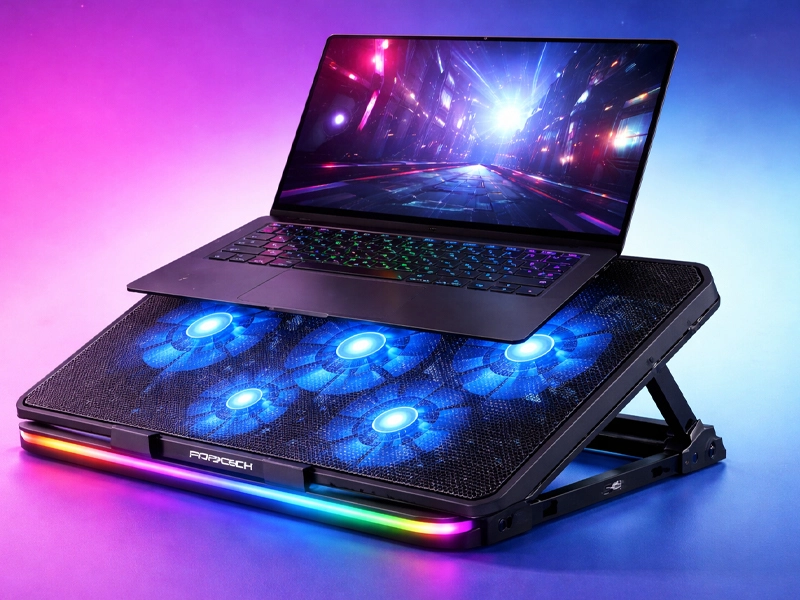
More than most people realize, keeping your laptop cool is important. Speed, battery health, and internal components are all directly impacted by heat. Performance deteriorates when temperatures rise. That stress will be lessened by the Frontech laptop cooling pad.
During prolonged gaming or work sessions, it helps to maintain stable operating conditions and improves airflow under your device. Processing power can be slowed down and even shut down unexpectedly as a result of excessive heat over time. That could derail important meetings, progress in online classes, or gaming. Those tense moments can be avoided with consistent cooling.
This pad facilitates smoother multitasking and consistent output by enhancing ventilation beneath the laptop. Additionally, it reduces the amount of heat felt on your lap or desk, making prolonged use more comfortable. Keeping your device’s temperature at a comfortable level enables it to perform at its best even during demanding tasks like rendering videos or playing games for extended periods of time.
A wide range of laptop sizes are supported by this cooling pad. It connects via USB and immediately begins working. There is no difficult set-up. Simply plug in your laptop by placing it on top. It is suitable for students, office workers, creators, and gamers due to its ease.
What distinguishes the Frontech laptop cooling pad?
Strong airflow is promised by many cooling pads. Not all deliver consistent results. Instead of focusing on unnecessary extras, the Frontech laptop cooling pad prioritizes practical cooling performance.
The fans are positioned to target the most prevalent heat areas. Under the laptop’s base, air moves evenly. The level of noise is still controlled. During video calls or late-night study sessions, there is no loud buzzing. The structure does not sag under weight and has a solid feel. When typing or using a heavy gaming laptop, stability is important.
Ergonomics are enhanced by the design’s slight inclination. When you work for a long time, it’s easier on your wrists to rest. The combination of improved cooling and improved posture makes everyday work more comfortable.
How to use the cooling pad and set it up
You can get everything set up and working in no time. This Frontech laptop cooling pad should be placed on a table or desk with a flat surface. Maintain stability. Then, place your laptop on top of the mesh surface directly. Insert the USB cord into your laptop to power it up. The fans begin right away.
Speed controls or lighting options may be included in some variations. Depending on your workload, you can adjust airflow if it is available. Standard speed is adequate for routine browsing. Better heat management is supported by increased airflow for tasks such as editing or gaming.
Check to see that the vents on the laptop are in line with the flow of air. This makes things work better. The cooling system will function as intended and the internal fans will be supported by proper positioning.
Why a laptop cooling pad should be considered by every user
Laptops of today are powerful but small. Batteries, graphics chips, and processors all occupy small spaces. Heat quickly builds up when working hard. Although external airflow aids in reducing strain, internal fans attempt to manage it. Hardware lifespan can be shortened by prolonged heat exposure.
Thermal throttling is another possibility. As a result, your system slows down in order to safeguard itself. A cooling pad lowers surface temperature and supports consistent performance.
If you often edit videos, play games, or run design software, heat control becomes important. A cooler base is more comfortable on your lap or desk even when you are doing regular work. Simple adjustments to the temperature make daily use easier.
The Frontech laptop cooling pad in comparison to other options
Some cooling pads use tiny fans that only move a small amount of air. They’re pretty, but they don’t do much. In order to improve airflow coverage, the Frontech laptop cooling pad typically employs multiple larger fans. RGB lighting and styling are a big part of some high-end brands’ aesthetics.
Airflow strength is more important than visual design. This model combines simplicity of design with functionality. The experience is not overly complicated by it. Frames made of weak plastic are sometimes used in cheaper options. They break or become unstable over time. This build quality seems to be more reliable. It resists bending under the strain of daily use.
The user experience and design
The layout is simple and easy to use. The mesh at the top lets air flow freely. Laptops are held in place by the structure without slipping. Typing posture is naturally improved by the angled layout. The fan noise is still under control.You can use it comfortably in public spaces like libraries.
Most desk arrangements work with the USB cable’s length. It has a clean design that doesn’t get in your way. It feels natural to use it daily.
After a few days, you barely even notice it’s there.
Practical advice before purchasing Frontech laptop cooling pad
Before you buy a laptop, check its size. Common sizes are supported by most pads, but confirming dimensions prevents issues. Additionally, check the number of USB ports on your laptop. A hub might be necessary if you use many peripherals. Take into account your usage pattern.
This accessory becomes more valuable if your laptop frequently heats up. Even if you primarily browse or watch videos, it may not feel as dramatic. Pay attention to where the fans are placed and how strong the airflow is. Air reaches internal vents when designed correctly.
Also, think about portability. Choose a model that fits easily in your bag if you frequently travel. A cooling pad isn’t just for gaming.
Frequently Asked Questions for Frontech laptop cooling pad
Q. Is a power adapter required?
A. No. It operates solely via a USB connection.
Q. Can it handle laptops for gaming?
A. Yes. It works with most gaming laptops of a reasonable size.
Q. Is heating completely eliminated?
A. Although it significantly lowers surface temperature, no accessory can completely remove heat.
Q. Can the fan speed be adjusted?
A. Depending on the model, some versions include speed controls that can be adjusted.
Q. Will it lengthen the life of the laptop?
A. It can help preserve hardware health over time by lowering heat stress.