By Pallavi Dogra
Microsoft Copilot New Features Released: AI Upgrades That Could Change Productivity
Artificial intelligence tools are evolving rapidly, and Microsoft continues to push deeper into the AI ecosystem with major improvements to Copilot. The latest updates are already creating excitement among professionals, students, developers, and business users worldwide as Microsoft Copilot New Features Released across multiple platforms and services.
Microsoft has been aggressively integrating Copilot into Windows, Microsoft 365, Edge, Teams, and developer tools. With these new AI-powered upgrades, the company aims to make everyday tasks faster, smarter, and more automated.
The latest Copilot Microsoft Copilot updates focus on productivity, personalization, smarter AI responses, workflow automation, and better integration with Microsoft applications.
As competition in the AI industry increases, Microsoft appears determined to position Copilot as one of the most useful AI assistants for daily use.
Microsoft copilot new features 365 Released with Smarter AI Assistance
One of the biggest improvements in the latest update is enhanced conversational intelligence. Microsoft has reportedly improved Copilot’s ability to understand user intent, context, and follow-up questions more accurately.
This means users may now receive more natural and relevant responses during conversations.
The AI assistant can reportedly handle:
- Complex prompts
- Multi-step tasks
- Document summarization
- Email drafting
- Meeting preparation
- Content generation
These upgrades are expected to improve productivity for both casual users and enterprise customers.
Many users previously complained that AI assistants often lost context during long conversations. Microsoft appears to be addressing this issue with improved memory and contextual understanding.
Microsoft Copilot New Features Released for Windows Users
Windows integration remains one of Copilot’s strongest advantages.
According to recent reports, Microsoft is expanding Copilot’s ability to control system settings directly through voice or text commands.
How the New Windows AI Features Could Help
Users may now be able to:
- Adjust brightness settings
- Enable dark mode
- Manage Bluetooth devices
- Organize desktop windows
- Launch apps quickly
- Troubleshoot PC problems
This deeper system-level integration could make Windows devices easier to use, especially for less technical users.
Microsoft is also reportedly improving Copilot’s ability to analyze on-screen content and provide contextual suggestions.
Microsoft Copilot New Features Released with Better Microsoft 365 Integration
365 applications are receiving some of the biggest AI upgrades.
Copilot inside Word, Excel, PowerPoint, Outlook, and Teams is expected to become more powerful and efficient.
AI Features Coming to Microsoft Office Apps
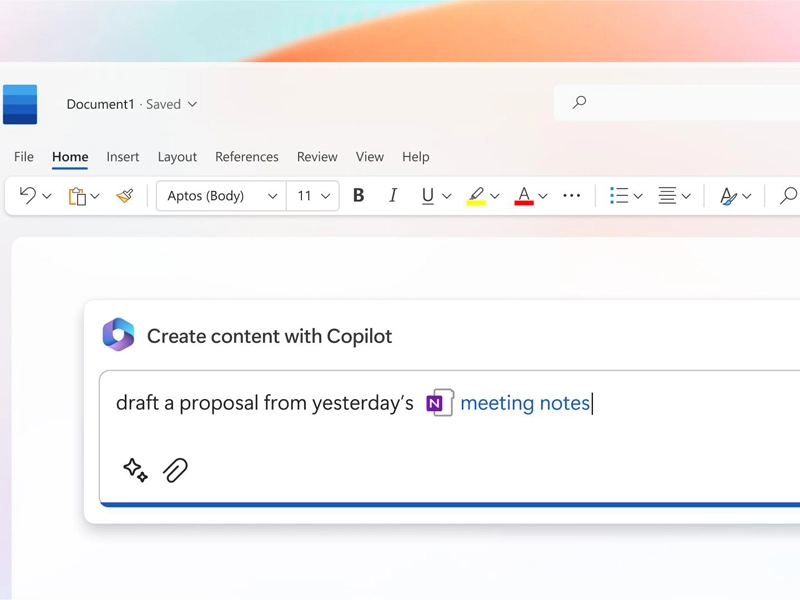
In Microsoft Word, Copilot may now help users rewrite content, summarize long documents, and improve writing tone more accurately.
Excel users could benefit from AI-powered data analysis, automatic chart creation, and formula suggestions.
PowerPoint integration may allow users to generate complete presentations using simple prompts.
Outlook users can reportedly use Copilot to summarize long email threads and generate quick responses.
Teams integration is also improving with AI-generated meeting summaries, action points, and task tracking features.
These Microsoft Copilot updatess may significantly reduce workload for professionals working in office environments.
Microsoft Copilot New Features Released for Developers

Developers are also expected to benefit from the latest Copilot upgrades.
Microsoft is improving AI-powered coding assistance for programmers using Visual Studio and GitHub Copilot technologies.
How Developers Could Benefit
The updated AI tools may help developers:
- Write code faster
- Detect bugs
- Improve debugging
- Generate documentation
- Automate repetitive coding tasks
AI-assisted programming is becoming increasingly popular because it saves time and improves workflow efficiency.
Many software companies are already integrating AI coding tools into daily development operations.
Microsoft Copilot New Features Released with AI Personalization
Personalization is another major area Microsoft appears to be focusing on.
The company is reportedly developing smarter AI models that adapt based on user behavior and preferences.
This could help Copilot provide:
- More relevant recommendations
- Personalised task suggestions
- Smarter productivity insights
- Customized workflow automation
Over time, AI assistants may become more proactive rather than simply reacting to user commands.
This shift could make digital assistants far more useful in daily life and professional work environments.
AI Security and Privacy Improvements
As AI adoption grows, privacy concerns continue to increase as well.
Microsoft copilot new features 365 Released with Enterprise Security
Some expected security improvements include:
- Better access control
- Data encryption
- Secure AI processing
- Enterprise compliance support
- Improved admin management tools
Businesses adopting AI solutions often prioritize privacy and security before deployment.
Microsoft appears to be targeting enterprise customers heavily with these improvements.
Copilot New Features Released in Edge Browser
Microsoft Edge is also receiving deeper Copilot integration.
Users may soon experience smarter browsing assistance with AI-generated summaries, web research tools, and contextual recommendations.
How Copilot Could Improve Browsing
The AI assistant may help users:
- Summarize webpages
- Compare products
- Organize research
- Generate quick notes
- Answer questions while browsing
This could transform the browsing experience into a more interactive and productivity-focused environment.
AI-powered browsing assistants are becoming increasingly important as online information continues growing rapidly.
Pros and Cons
Pros
- Improves productivity and workflow efficiency
- Strong integration with Microsoft ecosystem
- Helpful AI assistance for documents and emails
- Better coding support for developers
- Smarter contextual understanding
- Enhanced enterprise security features
Cons
- Some advanced features may require subscriptions
- AI-generated content may still need human review
- Privacy concerns remain for some users
- Heavy AI processing may require strong hardware
- Learning curve for first-time AI users
Why Microsoft Is Expanding Copilot So Aggressively
The AI competition between major tech companies is becoming more intense every month.
Microsoft has invested heavily in AI technologies and wants Copilot to become deeply integrated into both personal and enterprise workflows.
The latest updates suggest that Microsoft sees AI assistants not as optional tools but as essential parts of future computing experiences.
As Microsoft 365 Copilot New Features Released across more products and services, the company could strengthen its position in the global AI market significantly.
Final Thoughts on Microsoft Copilot New Features Released
The newest Microsoft Copilot updates show how quickly AI technology is evolving across productivity platforms.
From smarter document creation and AI coding assistance to personalized workflows and system-level Windows integration, Microsoft appears focused on making Copilot more useful in everyday life.
While some challenges like privacy concerns and AI accuracy still remain, the overall improvements indicate that AI-powered productivity tools will continue becoming more advanced in the coming years.
If these features perform as expected, Microsoft Copilot could become one of the most important AI assistants for professionals, students, developers, and businesses worldwide.
FAQs
Q. What are the latest Microsoft Copilot features?
A. The latest features include smarter AI conversations, improved Microsoft 365 integration, coding assistance, AI personalization, and enhanced Windows controls.
Q. Is Microsoft Copilot available inside Windows?
A. Yes. Microsoft is integrating Copilot deeply into Windows for system controls, productivity tasks, and AI assistance.
Q. Can Microsoft Copilot help with coding?
A. Yes. Copilot offers AI-powered coding support, debugging assistance, and code generation tools for developers.
Q. Are the new Microsoft Copilot features free?
A. Some features may be available for free, while advanced enterprise and productivity features could require Microsoft subscriptions.
Q. Why are Microsoft Copilot New Features Released important?
A. These updates improve productivity, automation, workflow management, and AI integration across Microsoft products.
Q. Can Microsoft Copilot summarize emails and documents?
A. Yes. Copilot can summarize long documents, email threads, meetings, and reports to save time and improve efficiency.