By Chetanya Sarraf
Chicklet wireless keyboard
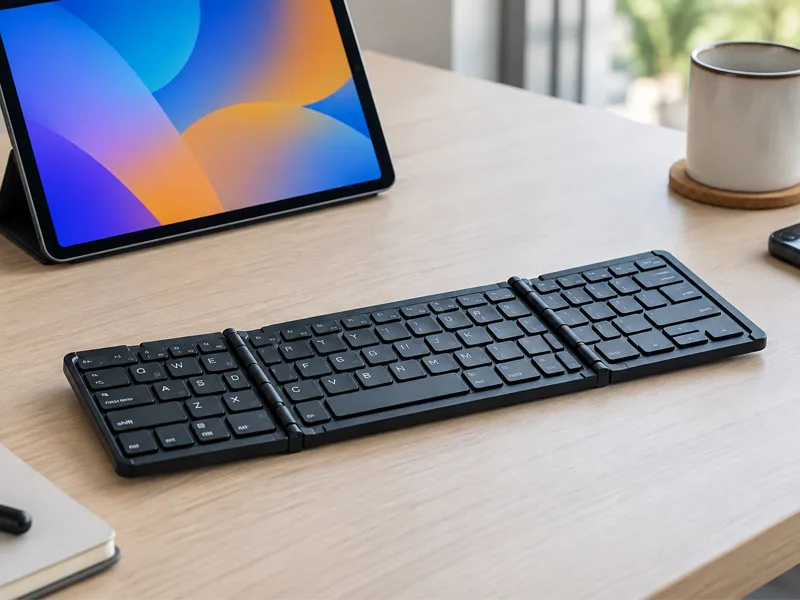
A compact keyboard can make tablets, phones and lightweight work setups more comfortable. The Chicklet wireless keyboard combines a foldable body, Bluetooth connectivity and a rechargeable battery in a portable format. It is aimed at people who want physical keys without carrying a full-size desktop keyboard.
A different approach to everyday typing in av
The foldable design is the main attraction. The keyboard can be folded after use, making it easier to store inside a bag. When opened, it measures 314 x 85 x 7.5 mm and weighs around 175 grams, according to Portronics. That makes portability one of its clearest advantages.
The lightweight construction is particularly useful for people who move between locations during the day. Instead of leaving a keyboard permanently on a desk, users can carry it with a tablet and create a temporary workstation whenever necessary.
Bluetooth keeps the setup simple
The keyboard connects through Bluetooth and works with compatible Android, iOS and Windows devices. Portronics says the connection range can reach up to 8 to 10 metres.
Pairing is straightforward: switch on the keyboard, activate Bluetooth on the device, select it from the available devices and complete the connection. Once paired, users can move between a desk, sofa or travel workspace without dealing with a cable.
Battery life of Chicklet wireless keyboard
The built-in 180mAh lithium-polymer battery is rated for up to 140 hours of working time, while standby can extend to around six months depending on usage.
Sleep and automatic power-off functions are designed to reduce unnecessary battery consumption. These features are useful when the keyboard is carried regularly.
For someone who travels frequently, battery management can be just as important as the keyboard’s size. Keeping the keyboard charged before leaving home can help avoid interruptions during study sessions, meetings or journeys.
What the typing experience feels like
Compact keyboards involve a balance between portability and comfort. The Chicklet uses relatively large keys for its size, and Portronics describes the layout as ergonomic with silent keystrokes.
The foldable construction makes the product easier to carry, but it does not provide exactly the same rigid feel as a conventional office keyboard. For emails, documents, messages and light productivity, the design can make sense.
Users who normally type on a laptop may need a short adjustment period because the key spacing and overall layout are different. Once familiar with the arrangement, everyday writing can become more natural.
Compatibility of Chicklet wireless keyboardbeyond laptops
A tablet can become more practical for writing longer documents, while a smartphone can be used for messages or quick work when a physical keyboard is preferred.
There is no dedicated Chicklet wireless keyboard app required for basic pairing. The keyboard works through Bluetooth, allowing users to connect it directly to supported devices without installing drivers.
This makes the setup relatively straightforward for people who do not want additional software. It can also be convenient when switching between compatible devices at home, college or work.
Price and everyday value
The Chicklet wireless keyboard price changes between sellers and promotions. Portronics currently lists the product at ₹1,249, reduced from an MRP of ₹1,999 on its website. Retail listings can show different prices, so buyers should check the final price, warranty and seller details before ordering.
Its value comes mainly from portability rather than advanced features. Someone working from a fixed desk may prefer a larger keyboard, while frequent travellers can benefit more from the foldable format.
What a practical review reveals
A useful Chicklet wireless keyboard review should look beyond specifications. The lightweight construction can be convenient for students, remote workers and travellers.
The product makes more sense as a portable productivity accessory than as a direct replacement for a full desktop keyboard. Users who type for many hours every day may prefer a larger keyboard with more space and a sturdier frame.
The design is therefore best judged according to the user’s routine. Someone carrying a tablet every day may appreciate the folding mechanism much more than someone who rarely leaves a desk.
Where it fits best
The keyboard suits people who switch between devices. A tablet becomes more useful for longer writing, while a phone can handle messages without relying entirely on its touchscreen. Students and travellers can also pack it easily.
It can also work as a secondary keyboard at home. Users can keep their main desktop keyboard in place while carrying this smaller option when they need to work from another room.
Before you buy
Check Bluetooth compatibility and operating system support before ordering. Consider how often you will carry and fold it. For emails, notes and occasional documents, the compact design can be practical. Heavy typists may prefer a larger keyboard with more working space. Its low weight also makes it convenient for flexible mobile workspaces.
Buyers should also consider the surface on which they normally type. A stable table provides a more comfortable experience than using a compact keyboard directly on a soft bed or sofa.
Portability for students and travellers
Students can benefit from a keyboard that takes up little room inside a backpack. It can be paired with a tablet for assignments, research notes and online learning without requiring a traditional laptop for every task.
Travellers may find the same approach useful for emails, planning documents and quick work sessions. Since the keyboard folds down, it can be stored alongside chargers, notebooks and other accessories without occupying much space.
The biggest advantage is flexibility. Users are not restricted to a permanent desk and can build a simple typing setup whenever they need one.
Everyday productivity benefits of Chicklet wireless keyboard
A physical keyboard can make longer typing sessions more comfortable than repeatedly using a touchscreen. Writing emails, preparing notes, filling forms and editing short documents can feel more natural with dedicated keys.
However, the product should not be viewed as a replacement for every laptop or desktop keyboard. People using advanced software or spending most of their working day typing may require a larger, more ergonomic setup.
Pros and Cons
Pros
- Lightweight foldable design
- Bluetooth connectivity
- Rechargeable battery
- Works with Android, iOS and Windows
Cons
- Compact layout requires adjustment
- No full-size desktop feel
- Bluetooth 3.0 is relatively old
- Foldable design may not suit heavy typists
Final Thoughts
The Chicklet wireless keyboard is built for people who value portability without giving up physical typing. Its foldable design, Bluetooth connection and rechargeable battery make it particularly suitable for tablets, smartphones and flexible workspaces.
It is not intended to replace every desktop keyboard. Instead, it offers a practical middle ground for users who want something light enough to carry and capable enough for everyday writing. Checking compatibility and current pricing before purchase is still important.
FAQs
Can it connect to a smartphone?
Yes. It can connect to compatible Bluetooth-enabled smartphones, including supported Android and iOS devices.
How long can the battery last?
Portronics rates the built-in battery for up to 140 hours of working time, although actual results depend on usage.
Does it need a separate app?
No. Basic operation uses Bluetooth pairing, so a dedicated app or driver is not required.
Is it suitable for travel?
Yes. Its foldable body and low weight make it easier to carry than many conventional keyboards, which is one of its main purposes.